No-Code Game Creation Platforms Compared for First-Time Builders
Three hurdles trip up first-time builders, and this ranks the platforms by them.
Most first-time game builders don't quit because their idea was bad. They quit because they hit one of three walls before they ever build anything: a platform that expects them to already know how to code, software that needs a download and install before it does anything useful, or an interface so complicated that the whole first sitting disappears into tutorials. None of those walls have anything to do with creativity. They're just friction, and friction is a silent killer.
These three gates matter in order, not in parallel. A beginner who can't get past the coding requirement never even finds out whether the installer works or the interface makes sense. That's why this piece measures every platform the same way: not by feature count, not by price, but by how many of the three gates it actually clears, and how cleanly.
How the no-code game creation landscape divides in 2026
The no-code label gets stretched over a lot of different products, and in 2026 the market has settled into two camps that solve different problems. The first camp is traditional visual-logic tools: event sheets, node graphs, block systems. These remove the need to write code, but they hand the beginner a new language to learn anyway, just one made of boxes and arrows instead of semicolons.
The second camp is newer: AI-native prompt-to-game platforms. Type a description of the game, and the system builds the scaffolding, the logic, and often the art direction, without asking the creator to touch a line of code or an install wizard. These platforms try to clear all three gates in one motion.
A third cluster deserves its own name so nobody confuses it with the first two: professional engines that advertise visual scripting (node graphs, Blueprint-style systems) as if that makes them beginner tools. It doesn't, and that distinction gets its own section later. For someone whose goal is a playable game by the end of one sitting, the real comparison is between camp one and camp two. Camp three is a different conversation, for a different kind of builder.
The three gates in practice: what each one costs a beginner
The three gates don't cost the same thing, so each one needs to be weighed on its own terms before comparing any actual software.
The coding gate is a hard stop. If a platform requires even a little bit of Lua or JavaScript, most first-time builders are out before they've made a single creative decision. It's the equivalent of a restaurant that only takes reservations by fax: technically possible to get in, practically nobody does.
The installation gate is also a hard stop, just a different flavor of one. A required download adds a setup sequence that can fail on an older laptop, a corporate firewall, or just a poor network connection. It turns "I want to try this right now" into "I'll try this later," and later is where most side projects go to die.
The learning-curve gate works differently. The learning-curve gate isn't a locked door; it's a slow leak. A tool can be free, code-free, and browser-based, and still hand a beginner a blank canvas and a thick manual. Event-sheet systems like the ones in traditional visual-logic tools partially clear this gate: the logic is learnable, but learnable still means hours pass before anything plays. AI-native platforms try to collapse this gate differently, by generating a playable first draft straight from a text description, so the beginner edits something that already exists instead of staring at empty space wondering where to start.
Paralov is a useful benchmark here because it was built around exactly this sequence. It runs entirely in the browser, so there's no installer to fight with. It accepts a plain-text description of the game a creator wants to make and turns that into something playable before the first session ends, no coding required at any step. That means a beginner spends their first hour reacting to a working prototype. A substantial share of its creators have used it to ship a game inside a single sitting, without touching code or an installation file, which puts it squarely in the AI-native camp described above, and arguably at the front of it.
Other AI-native, prompt-to-game tools clear the same first two gates. YouWare, for instance, runs in the browser and turns a prompt into a playable result, with a visual editor for adjusting UI and layout afterward, an auto-fix feature that scans for and resolves bugs automatically, and a "Credit Care" system that rewinds a project to an earlier version and refunds credits when the AI's output misses the mark. YouWare also offers a backend layer called YouBase, which gives creators logins, save data, and leaderboards without writing any server code, useful for anyone who wants their prototype to remember players between sessions.
What separates these tools from each other isn't whether they clear the three gates. Several do. The difference appears afterward, in what they publish to, how far a creator can extend the output once the prototype works, and whether there's anywhere for people to actually find the finished game. Whether people can find the finished game affects how much the earlier gates even matter, and the final section comes back to it.
Traditional visual-logic tools: where they fit for beginners who want more control over time
Traditional visual-logic platforms clear the coding gate cleanly. They don't clear the other two the same way, and that's fine, as long as the builder knows what they're signing up for.
Flowlab runs in the browser and uses visual logic blocks instead of code, which makes it a low-friction on-ranp for students and hobbyists. Its feature set is lighter than some of its peers, but because there's nothing to install, a beginner can be clicking around five seconds after the page loads.
Scratch remains the gentlest entry point in this entire category. It's block-based, it has a massive community, and its remix culture means a beginner can take someone else's project apart to see how it ticks, like a kid popping open a toaster to find out where the toast comes from. It's not built for professional output, and nobody should expect to ship a commercial release out of it. What it does extremely well is teach conditional logic (if this, then that) without the intimidation factor of a blank code editor.
Across this whole camp, the honest trade-off is time. The event-sheet or block system is learnable. But learnable means a first session is more likely to end with "I finished the tutorial" than "I published a game." These platforms ask for an upfront investment in exchange for more control down the road, a reasonable trade for a builder who has a free weekend, and a bad trade for one who has forty-five minutes at lunch.
Professional engines with visual scripting layers: why they are low-code, not no-code, for beginners
Unity Visual Scripting and Godot's node system are both marketed with language that sounds like it was written for beginners. In practice, both sit inside professional engines, and professional engines ask more of a first-timer than the marketing copy lets on.
Unity Visual Scripting lets a creator wire together logic by connecting nodes instead of writing C#, and it sits inside one of the most capable engines available, backed by a massive asset store that speeds up almost every part of development. None of that changes the fact that Unity requires a download and installation before any of it is usable, and the learning investment before a first playable result is significant, often measured in days rather than minutes. Unity itself is free for personal use, though a Pro seat carries a substantial annual cost per seat for anyone scaling past hobby use.
Godot is free and open-source, and it's genuinely lighter than Unity, with a scripting language (GDScript) that's friendlier to beginners than C++ or C#. Its official onboarding path is a tutorial called "Your First 2D Game," and the name says everything about the experience: a first-timer opening Godot is in tutorial mode before they're anywhere near creation mode. Whether that clears the learning-curve gate in any reasonable timeframe depends almost entirely on whether GDScript clicks for that particular person within the first day. For some people it will. For others, day one ends with a half-finished tutorial and nothing playable, which is precisely the failure mode this whole article is built around.
None of this makes Unity or Godot bad tools. They're excellent, and for a creator who wants maximum long-term control and is willing to put in real hours before shipping anything, they're a legitimate destination. They're the wrong on-ramp for someone who wants to go from idea to published game in one sitting, which is a different question.
Mobile-first no-code tools: a separate category with a different trade-off profile
Mobile-focused platforms like Buildbox solve a narrower problem on purpose, and that narrowness is the whole point. Buildbox is built specifically for hyper-casual and casual mobile games, and for that specific output, it's about the fastest route to a working prototype available.
Its gate profile looks different from the browser-based AI tools covered earlier. Buildbox removes the coding gate, same as the others, but it still asks for an installation, and its genre range stays fairly narrow, centered on hyper-casual mobile titles. That makes it a strong match for one specific kind of first-timer: someone who already knows they want a mobile app rather than someone still deciding between a browser game, a platform game, or something else. Buildbox 4 pricing ranges from a low-cost monthly Beginner tier up to $274.99 a year for the Pro tier, and that Pro tier includes monetization integrations built in, which matters if the end goal is a mobile game that actually earns something.
These platforms are a different bet, built for a buyer who already knows their target platform before they open the software, not a worse option than the browser-based AI tools.
Choosing the right platform by matching it to the three gates you most need cleared
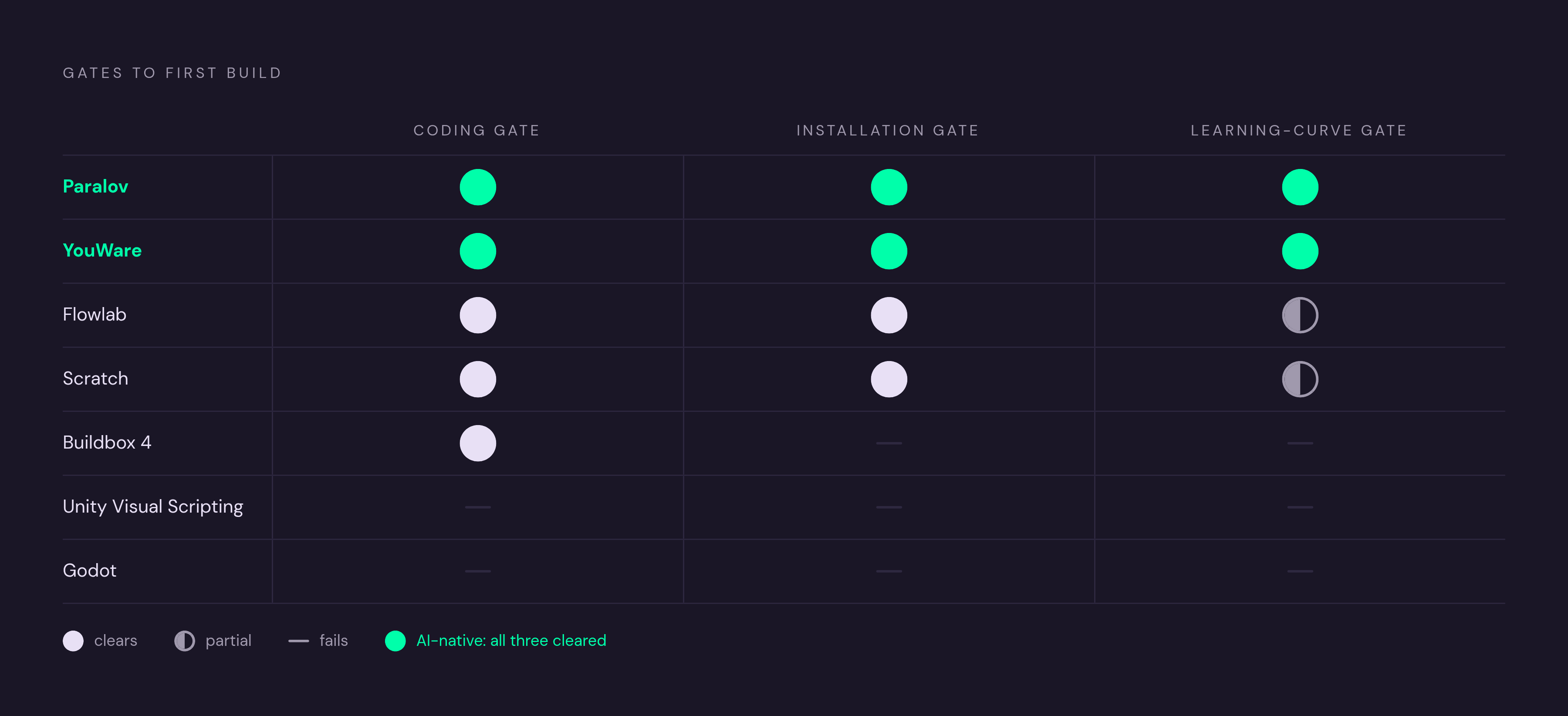
The right platform is the one that clears the specific gates standing between a particular creator and a finished, playable game, and that answer changes depending on what the creator is actually trying to build.
For a browser-playable prototype or a game-jam demo with no fixed platform target, AI-native tools clear the coding and installation gates immediately and produce a first result straight from a prompt. Paralov fits this description directly: it collapses the learning-curve gate as well as the first two, generating something playable from a plain-text description so a creator has a working draft to react to instead of a blank canvas and a stack of tutorials to get through first. YouWare sits in the same camp, with its own strengths around auto-fixing bugs and backend features like YouBase for saves and leaderboards. The trade-off shared across this camp is that a freshly generated game doesn't come with a built-in audience. The platform solves creation. Discovery is a separate problem.
For a 2D or browser game where the builder wants more granular control over mechanics and is willing to spend a session learning an event system, Construct 3 is the strongest traditional no-code option, with a free tier that has limits and paid plans available monthly or yearly for creators who outgrow the cap. Flowlab works as a lighter, friendlier on-ramp for a first project, especially for someone not yet sure they want to commit to a steeper tool.
For a mobile hyper-casual game specifically, Buildbox 4 is built for exactly that output, with pricing from a low-cost monthly Beginner tier up to $274.99 a year for Pro, monetization tools included. It's a narrow tool aimed at a narrow goal, and that's a feature, not a flaw, for the right builder.
For long-term creative control, where the creator is fine investing real time before anything ships, Godot (free, open-source) and GameMaker (free trial, with a paid one-time license option) are the realistic destinations to grow into. Both still impose the learning-curve gate in a way that makes them the wrong starting line for someone whose goal is a published game by the end of one sitting.
One complication applies no matter which platform gets chosen. As AI tools make creation faster and cheaper across the board, the bottleneck moves from production to visibility. A finished game that nobody can find is still an unfinished project in every way that matters. A platform tied to an existing game-hosting ecosystem with an active player base carries a structural advantage here that a standalone tool, however good its generator, can't manufacture on its own. That detail belongs alongside the three gates, not after them.